Dental Treatment Planning Software
Build a costed treatment plan from what you found at the examination, track every procedure to completion, and bill it without retyping a single line.
Start Free Month Book a DemoFree first month, 30 days with every feature unlocked · no credit card · priced per clinic, not per user · no setup or data-import fee.
Quick answer
Dental treatment planning software turns examination findings into a costed, sequenced list of procedures for one patient. In Dentrah, each procedure is priced from the clinic's own price list and tracked from started to finished. Notes attach to the plan and to each procedure and can be dictated by voice in the browser. Completed procedures become invoice lines, so billing is never retyped.
Key takeaways
- Built from findings: the plan is assembled from the clinical examination and the tooth chart, not typed from scratch.
- Priced per procedure: every line carries a price from your own list, in your own billing currency.
- Tracked: each procedure moves from started to finished, so unfinished work stays visible.
- Notes by voice: plan-level and procedure-level notes can be dictated in the browser, in English.
- Plan: treatment planning needs the recommended plan or the free first month; it is not in the limited plan.
What a treatment plan has to do
A treatment plan is three documents pretending to be one. It is a clinical decision, a quotation the patient agrees to, and a work list the clinic executes over several visits. Written on paper, those three drift apart within a month: the quoted figure is in a notebook, the work done is in the day sheet, and nobody is certain whether the second molar was ever restored.
Treatment plan software for dentists is only worth the migration if it keeps those three in one place. That means the plan has to know where its procedures came from, what each one costs, whether it has been done, and what was billed for it.
Step 1: the examination comes first
In Dentrah a plan does not start with a blank form. It starts with the clinical examination and investigations recorded against the patient, including radiographs. Those findings, together with anything marked on the dental charting and odontogram, are what the plan is built from.
The practical effect is that the plan and the justification for it sit on the same record. Six months later, the question "why was this crown planned?" has an answer on screen rather than in somebody's memory.

Step 2: procedures, priced from your own list
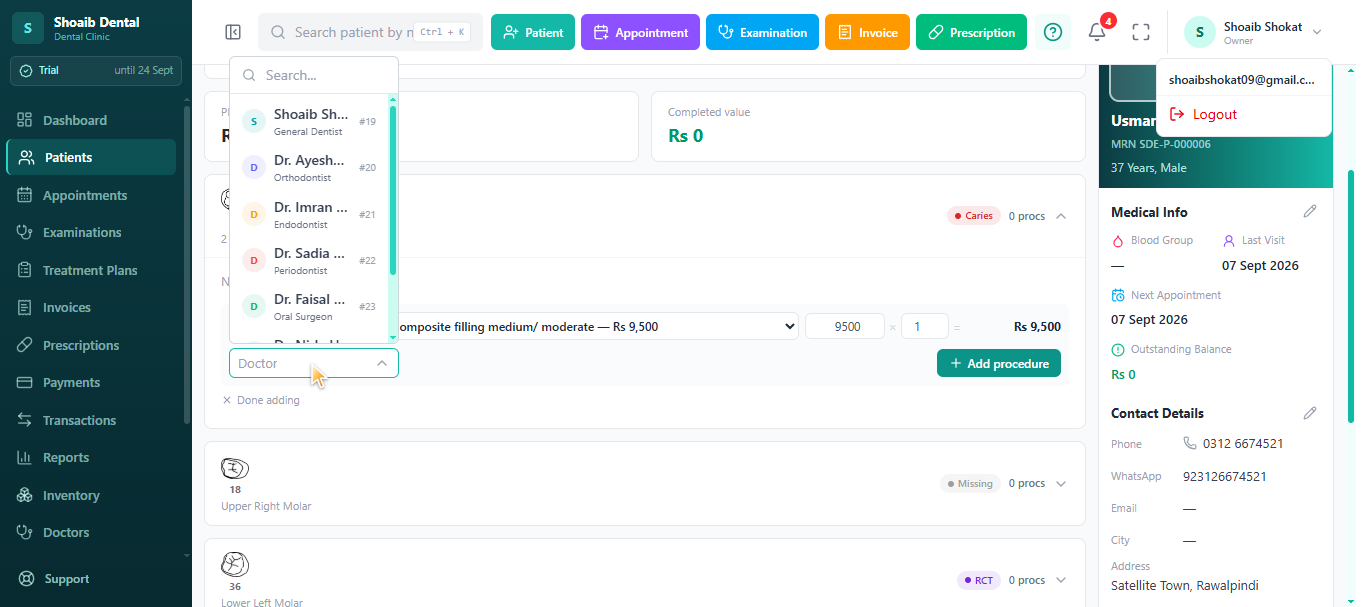
Each procedure added to the plan carries its own price, taken from the price list your clinic maintains. Nothing is assumed about what a root canal or a crown should cost, and nothing is imported from another market's fee schedule. Your prices, your currency.
Because the price lives on the line, the plan total is a real quotation. You can hand the patient a figure that will still match the invoice at the end of the course of treatment, which is the single most common source of argument at the reception desk.
Step 3: status, from started to finished
A multi-visit plan is a work list, and a work list without status is a wish. Every procedure on the plan is tracked from started to finished, so a patient who came for five procedures and had three is visible as exactly that, without anyone counting back through appointment notes.

| Recorded on the plan | What it is for |
|---|---|
| Procedures selected from the examination and chart findings | The plan is traceable back to what was clinically found |
| Price per procedure, from the clinic's own list | The plan total is the quotation the patient agrees to |
| Status per procedure, started through to finished | Unfinished work stays visible instead of being remembered |
| Notes on the plan as a whole | Sequencing, alternatives considered, what the patient was told |
| Notes on each individual procedure | Materials, technique, findings during the procedure itself |
| Completed procedures carried into the invoice | Billing is generated from the work, not typed again |
Notes on the plan and on each procedure
Two levels of note
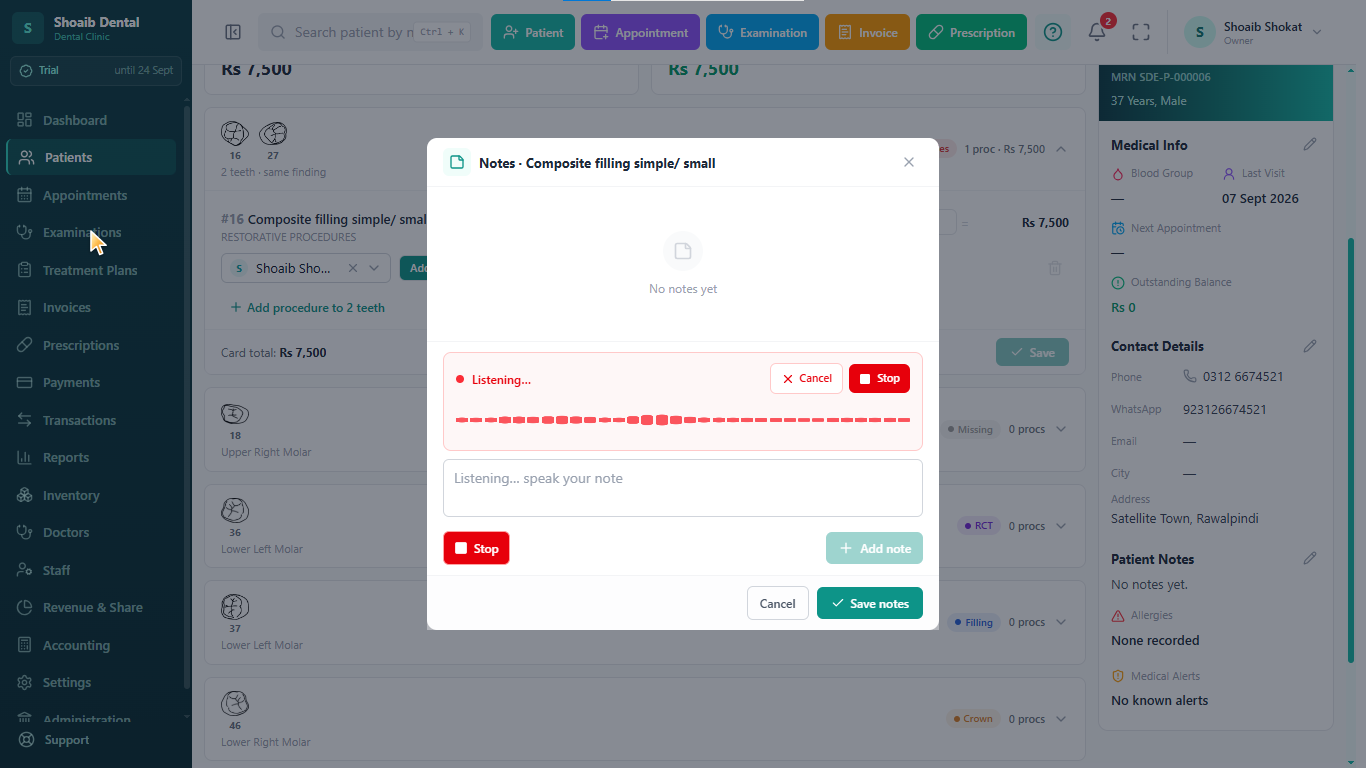
Notes attach in two places. A note on the plan as a whole holds the reasoning: why this sequence, what alternatives were discussed, what the patient was told about cost and time. A note on an individual procedure holds what actually happened at the chair for that one item. Keeping them apart stops the clinical detail of one appointment from burying the shape of the whole case. Our guide to what to record in dental clinical notes covers the content side in more depth.
Dictated by voice in the browser
Both kinds of note can be dictated by voice rather than typed, directly in the browser, with no extra software to install. For a dentist who writes notes between patients with gloves half off, this is the difference between a note written now and a note written from memory at 8pm. Dictation is in English only.
Step 4: the plan becomes the invoice
When a procedure is finished it becomes an invoice line. The quantity, price and any discount travel with it, the invoice prints on the clinic letterhead in the clinic's own currency, and part payments and the outstanding balance sit on the same record. Where an associate is on a commission arrangement, the share is calculated from that invoice line rather than from a separate register.
This is the whole argument for planning inside the clinic system rather than in a word processor: the plan is not a document you copy from, it is the thing the bill is made of. More on the billing end in dental billing software.
Multiple plans and treatment history
A patient is not one case. A course of restorative work in 2024, an extraction this year and a prosthetic plan starting next month are three plans on one record, each with its own procedures, prices, statuses and notes. Older plans stay readable as treatment history, so a new associate picking up the patient can see what was done, what was quoted and what was left unfinished.

Which plan includes treatment planning
Treatment plans are included in the recommended plan and during the free first month, which unlocks every feature for 30 days without a credit card. The limited plan covers appointments, prescriptions, invoices, payments and reports; it does not include examinations and investigations, treatment plans, dental charting, transactions, inventory, revenue share or accounting. A clinic can move from the limited plan to the recommended plan at any time. Current figures are on the pricing page, and every module is described under features.
Pricing is per clinic per month rather than per user, staff logins are not charged per seat, and there is no setup, onboarding or data-import fee.
Limits to know before you commit
The honest boundaries of treatment planning in Dentrah:
- Not in the limited plan. Treatment plans, and therefore voice-dictated plan notes, need the recommended plan or the free first month.
- No patient-facing plan portal. Patients cannot log in to view or accept a plan.
- No electronic signature. The plan prints or is shared from the clinic; consent is recorded the way your clinic already records it.
- Interface and dictation in English. There is no other language option.
These limits apply to Dentrah as a whole, in every country:
- Payments are recorded, not collected: there is no built-in card or online payment processing, and no payment-gateway integration.
- No insurance claim submission or electronic claims processing.
- No national health-record or e-prescribing integration.
- Support is provided remotely, in English, over WhatsApp and email, Monday to Saturday, 10:00 AM to 7:00 PM IST (UTC+5:30). There is no in-person or on-site support.
- The software interface and voice dictation are in English.
- No tax module: invoices show the clinic's own prices, and tax such as GST or VAT is not calculated.
Clinics looking specifically for dental treatment plan software in India — rupee billing, GST, UPI, ABDM and where the data sits — will find those questions answered on the page for dental clinic software in India. For the product as a whole, see the overview of Dentrah dental clinic management software.
Related: dental charting and odontogram · what to record in dental clinical notes · dental billing software
Dental treatment planning software: frequently asked questions
Plan a Real Case and See
Your first month is free, with treatment planning and every other feature unlocked. No credit card required.
Start Free Month Book a Demo