Dental Patient Management and Records Software
One record per patient, with medical history and alerts on the profile and every visit, plan, prescription, invoice and file on a single timeline.
Start Free Month Book a DemoFree first month, 30 days with every feature unlocked · no credit card · priced per clinic, not per user · no setup or data-import fee.
Quick answer
Dental patient management software keeps one electronic record per patient instead of a paper file. In Dentrah, each patient has an MRN, medical history, allergies and alerts, plus a single timeline merging appointments, examinations, treatment plans, procedures, prescriptions, invoices, payments and uploaded radiographs. Staff logins carry per-module permissions, and one account can run several branches.
Key takeaways
- One record: MRN, medical history, allergies and alerts on the patient profile itself.
- One timeline: every record type for that patient in chronological order, not nine separate registers.
- Files attached: radiographs and documents upload against the patient, next to the visit they belong to.
- Access control: individual staff logins with per-module permissions; not charged per seat.
- Branches: several locations in one account, with reports rolled up across them.
The problem with the paper file
A paper dental record is rarely one record. It is a folder of examination sheets, a separate appointment diary, a prescription pad carbon, a receipt book, and an envelope of radiographs in a drawer. Each is accurate on its own. Together they cannot answer a simple question: what has actually happened to this patient, in order, since they first walked in?
Paperless dental records only fix this if the software merges those streams rather than reproducing them as separate digital drawers. A system with nine tidy modules and no way to see one patient across all nine is a filing cabinet with a login screen.
The patient profile
In Dentrah every patient has one profile holding the things a clinician needs before touching anything: the medical record number, contact and demographic details, medical history, and allergies and alerts. These live on the profile, not as a note inside a visit from two years ago, because a penicillin allergy that has to be hunted for is an allergy that will be missed.
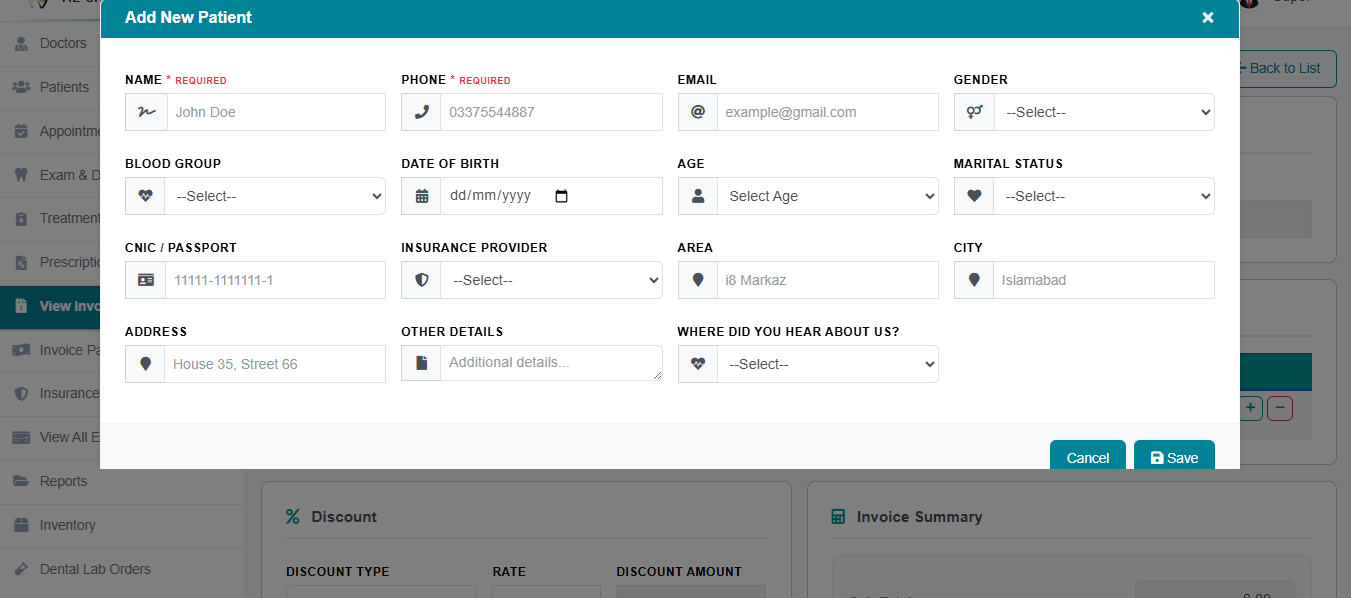
Finding a patient again
Registration is the easy half. The half that decides whether staff keep using the system is retrieval: a patient who phones and gives a name, not an MRN, on a Tuesday morning with three people waiting. The patient list is the working screen for that, and it is where most of a receptionist's day is actually spent.

One timeline instead of nine registers
This is the part that makes a dental patient database worth keeping. Open a patient and you get a single chronological timeline that merges every record type attached to them. Nothing has to be cross-referenced by hand.
| On the timeline | The question it answers |
|---|---|
| Registration | When did this patient first come to us, and with what history? |
| Appointments | When were they booked, when did they attend, when did they not? |
| Examinations and investigations | What was clinically found, and on what evidence? |
| Treatment plans | What was proposed, at what price, and how far did it get? |
| Procedures | What was actually carried out, and when? |
| Prescriptions | What were they given, at what dose and for how long? |
| Invoices and payments | What were they charged, what did they pay, what is still outstanding? |
| Uploaded files | Where is the radiograph or document that supports all of the above? |
The clinical half of that timeline is fed by the dental charting and odontogram and by examinations, which in turn feed dental treatment planning. What belongs in the written part of each entry is covered in our guide to dental clinical notes.

Files and radiographs
Uploaded files attach to the patient rather than to a shared folder on somebody's desktop. A radiograph sits next to the examination that called for it, so the image and the finding are read together. For a clinic going paperless, this is usually the step that finally empties the drawer of envelopes.
Who can see what: staff logins and permissions
Patient records are not uniformly sensitive to every role. Each staff member has an individual login with per-module permissions, so a receptionist managing the diary need not have the same access as an associate writing clinical notes or the owner reading revenue reports. Individual logins also mean the record shows who entered what, instead of a single shared password that makes every entry anonymous.
Because pricing is per clinic per month rather than per user, adding a login for a part-time hygienist costs nothing. There is no incentive to share accounts, which is the usual reason small clinics end up with one login for six people.
Several branches, one patient database
Multiple branches run inside one account, and reports on revenue, appointments and collections roll up across them. A patient seen at the second location is on the same system as one seen at the first, rather than in a parallel installation that has to be reconciled at the end of the month.
Dental EMR software in India: what to check
Indian clinics usually search for this as dental EMR software, and the words EMR, EHR and patient management get used interchangeably in local listings. Two concrete questions matter more than the terminology. First, data location: Dentrah does not host clinic data in India, and we will confirm the hosting region in writing on request, so a clinic with a data-residency requirement can decide with the facts in hand. Second, ABDM: there is no ABDM or ABHA integration, so Dentrah cannot create or link ABHA numbers. Rupee billing, GST and UPI are handled on the page for dental clinic software in India. How the platform is built and where data is hosted is described under technology.
Which plan includes patient records
Patient records, appointments, prescriptions, invoices, payments and reports are in every plan, including the limited plan. What the limited plan leaves out is the clinical depth that makes the timeline complete: examinations and investigations, treatment plans, dental charting, transactions, inventory, revenue share and accounting. Those are part of the recommended plan and of the free first month, which unlocks every feature for 30 days with no credit card. A clinic can move up at any time. Figures are on the pricing page; each module is described under features.
Limits to know before you commit
The honest boundaries of patient management in Dentrah:
- Data is not hosted in India. The hosting region is confirmed on request.
- No ABDM or ABHA integration. ABHA numbers cannot be created or linked.
- No patient portal and no self-booking. Patients do not log in; staff operate the record and the diary.
- English interface only. There is no other language option.
These limits apply to Dentrah as a whole, in every country:
- Payments are recorded, not collected: there is no built-in card or online payment processing, and no payment-gateway integration.
- No insurance claim submission or electronic claims processing.
- No national health-record or e-prescribing integration.
- Support is provided remotely, in English, over WhatsApp and email, Monday to Saturday, 10:00 AM to 7:00 PM IST (UTC+5:30). There is no in-person or on-site support.
- The software interface and voice dictation are in English.
- No tax module: invoices show the clinic's own prices, and tax such as GST or VAT is not calculated.
Dentrah runs on the jDent dental practice platform. Your clinic account opens at app.jdentclinic.com and the mobile app is listed as jDent in the app stores. For the product as a whole, see the overview of Dentrah dental clinic management software.
Related: dental treatment planning software · dental charting and odontogram · how the platform is built and where data is hosted
Dental patient management software: frequently asked questions
Put One Patient on the System
Your first month is free, with every feature unlocked. Register a real patient and see the whole timeline build. No credit card required.
Start Free Month Book a Demo