Dental Appointment Scheduling Software
A drag-and-drop dental diary by doctor and time slot, with a live queue of waiting patients and reminders your front desk sends in one tap.
Start Free Month Book a DemoFree first month — 30 days with every feature. No credit card. Priced per clinic, not per user. No setup fee and no data-import fee.
Quick answer
Dentrah is cloud dental appointment scheduling software. The diary is laid out by doctor and time slot, appointments are moved by dragging them, arrived patients sit in a live queue, and each dentist has a weekly availability. Staff send WhatsApp reminders from the appointment row in one tap. Patients cannot book themselves, and no reminders are sent automatically.
What a paper appointment book costs you
The appointment book is the one record every clinic already keeps, which is exactly why it is the last one anybody replaces. It works until the morning a dentist calls in sick and four hours of bookings have to be moved by hand, or until a patient rings to ask when they are due and the only copy of the answer is a page at the front desk that nobody else can see.
Scheduling software earns its place by removing those two failures: changing the day should be a movement, not a rewrite, and the day should be visible to everyone who needs it, including the dentist who is not standing at the desk.
How the clinic day runs in Dentrah
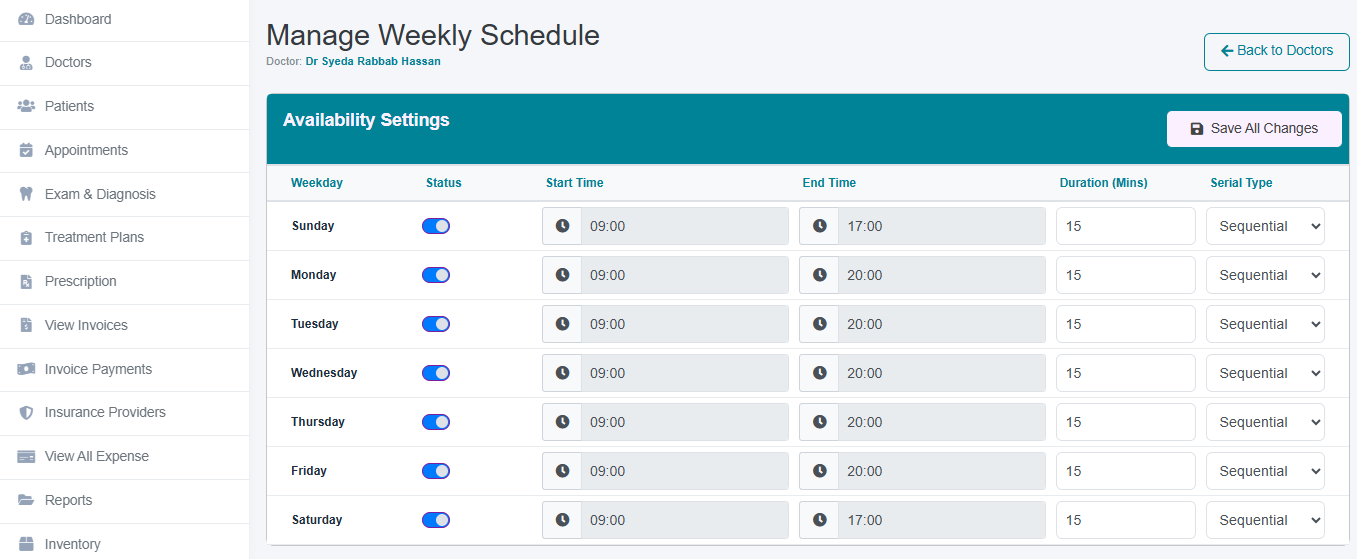
1. Set each doctor's weekly availability
Before anything is booked, each dentist has a weekly availability: the sessions they actually work. The diary is built on that rota, so the schedule matches who is in the building rather than assuming every chair is staffed all week.
2. Book into a slot, by doctor
An appointment is made against a patient, a dentist and a time slot. Where several clinicians work the same session, their columns sit side by side, so the person at the desk can see the whole clinic at once and offer the first genuinely free slot rather than the first one they can find.

3. Rearrange the day by dragging
Days change. A dentist is delayed, a long case overruns, an emergency arrives. Appointments are moved by dragging them to another slot or another doctor, which is the difference between a five-second change and a rewritten page. Nobody has to remember which version of the morning is the current one.

4. Work the live queue
Patients who have arrived sit in a live queue. That queue is the shared answer to the question the front desk is asked all day: how long. The desk and the surgery read the same list, so nobody walks between rooms to find out who is next.
5. Send the reminder, one tap
A reminder goes out from the appointment row itself, in one tap by a member of staff, using message templates the clinic writes for itself. It is deliberately a person deciding to send a message to a particular patient, not a broadcast. The page on WhatsApp appointment reminders covers how clinics word those templates and when they send them.
6. The appointment becomes the visit
The appointment is the front of the patient record rather than a calendar sitting beside it. From the booking, the visit carries on into the examination, the tooth chart, the treatment plan and the invoice, all on the same patient, all on one timeline — which is what dental patient management means in practice.
What the scheduling module does and does not do
| Scheduling job | In Dentrah |
|---|---|
| Diary laid out by doctor and time slot | Yes |
| Move an appointment by dragging it | Yes |
| Live queue of patients who have arrived | Yes |
| Weekly availability per doctor | Yes |
| WhatsApp reminder sent by staff, one tap, from the appointment row | Yes |
| Reminder templates the clinic writes | Yes |
| Diary in the browser and in the Android and iOS apps | Yes |
| Several branches in one account | Yes |
| Patient self-booking online, or a patient-facing app | No |
| Automated bulk SMS or WhatsApp reminders | No — reminders are staff-sent, one at a time |
Which plan includes appointment scheduling
Appointments are in the limited plan, together with prescriptions, invoices, payments and reports. The limited plan leaves out examinations and investigations, treatment plans, dental charting, transactions, inventory, revenue share and accounting, so a clinic that wants the visit to continue from the booking into the clinical record needs the recommended plan. The free first month unlocks every feature for 30 days with no credit card. Pricing is per clinic per month rather than per user, with no setup or data-import fee; the figures are on the pricing page and each module is described under features.
Limits worth knowing before you buy
- No patient self-booking and no patient-facing app. Appointments are made by clinic staff. If an online booking page is the reason you are shopping, this is not the product for you and it is better to know now.
- No automated bulk SMS or WhatsApp sending. Reminders are sent by a person, one tap at a time, from the appointment row. A clinic with a hundred bookings a day should expect that to be a task on somebody's morning, not something that happens overnight by itself.
The limits that apply to the whole product, everywhere:
- Payments are recorded, not collected: there is no built-in card or online payment processing, and no payment-gateway integration.
- No insurance claim submission or electronic claims processing.
- No national health-record or e-prescribing integration.
- Support is provided remotely, in English, over WhatsApp and email, Monday to Saturday, 10:00 AM to 7:00 PM IST (UTC+5:30). There is no in-person or on-site support.
- The software interface and voice dictation are in English.
- No tax module: invoices show the clinic's own prices, and tax such as GST or VAT is not calculated.
A single-handed practice has a different problem from a four-chair clinic: the page on dental software for solo dentists covers running the diary when the dentist is also the receptionist. Clinics in India have their own set of questions about billing and local rules. For the whole product, start at the Dentrah dental clinic software overview.
Dental appointment software: frequently asked questions
Run Next Week's Diary On It
Your first month is free, with scheduling and every other feature unlocked. No credit card, no setup fee.
Start Free Month Book a Demo